
Each invoice account within Service Manager can have a list of email addresses designated to receive invoices when they are sent. Additionally, each account code can have its own list of email addresses that override the primary ones for the account. This feature is particularly useful for accounts with sites or agreements managed by different individuals or departments.
To change email address for account
Navigate to the Account tab under the Invoices section.

Next, use the filters on the left to find the account for which you want to update the email addresses. Then, click the Edit button.
In the Email field, enter the email addresses you want to receive the emails. You can input multiple addresses by separating them with a comma or semicolon.
Click the Save button
To change email address for account code
Navigate to the Account tab under the Invoices section.
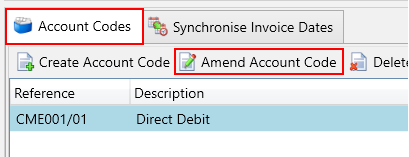
Next, use the filters on the left to find the account for which you want to update the email addresses. Then, click on the Account Codes tab. In the grid, select the account code you wish to update and press the Amend Account Code button.
In the Email field, enter the email addresses you want to receive the emails. You can input multiple addresses by separating them with a comma or semicolon.
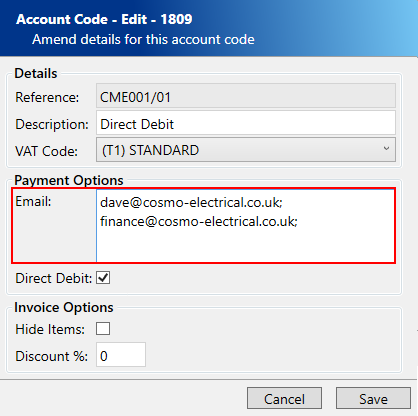
Click the Save button