
There will be times when a billpayer with multiple sites cannot consolidate all sites into one invoice. For example, a billpayer who is a contractor may require separate invoices for different franchises.
Grouping agreements by account code
When creating your invoices, each account code will have a separate invoice generated for it. An invoice account can contain multiple account codes, so the billpayer may receive multiple invoices depending on how their account codes are configured. This allows for great flexibility in how agreements on an account are invoiced.
Navigate to the Accounts tab under the Finance section.

Next, use the filters on the left to find the account for which you want to update the account codes. Then, click on the Account Codes tab and press the Create Account Code button.
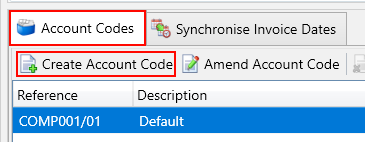
You will then be shown the account code popup where you can enter the details for the new account code.
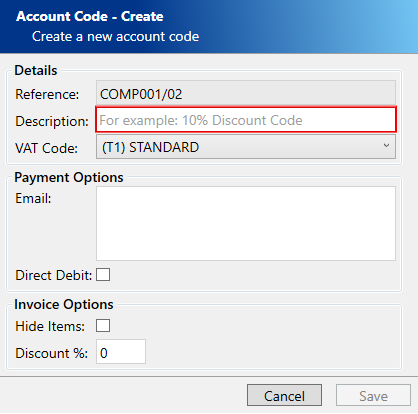
Enter the following compulsory fields:
- Description – A description of the account code. If you are creating an account code for a specific site or franchise, you can use a relevant name.
Click the Save button to confirm, and your new account code will be chosen in the Account Codes grid. Then, click the Add Agreement button on the toolbar and choose the agreement you wish to associate with this account code from the popup menu.
The agreement you choose will now appear under the account code. You can include multiple agreements under the account code to organize them according to your preferences. An agreement can only be associated with one account code.
Marking agreements as individual invoice
Each agreement can be designated as requiring an individual invoice. Unlike the account code method described above, if an agreement is marked this way, it will always be issued its own separate invoice regardless of any other settings.
Navigate to the Agreements tab under the Customers section.

Next, use the search filters to find the agreement that you want to mark as requiring an individual invoice. Then, press the Edit button.
Use the An individual invoice is created for this agreement checkbox to change the individual invoice status.
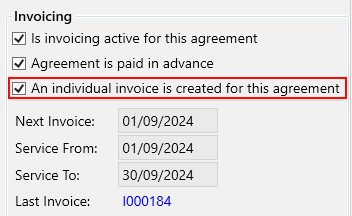
Click the Save button.