
There will be times when you need to reschedule an entire job for a site, rather than just individual items within that job. This is often necessary if the site is closed on a particular date or for similar reasons.
To add a site re-visit, navigate to the Manifest (Route) screen under the Manifesting section.

Use the filters on the left to search for the delivery associated with the job for which you want to schedule a site revisit, and select it in the grid at the top.
In the Sites tab, right-click on the job for which you want to schedule a site revisit, and select “Add Site Revisit” from the menu.
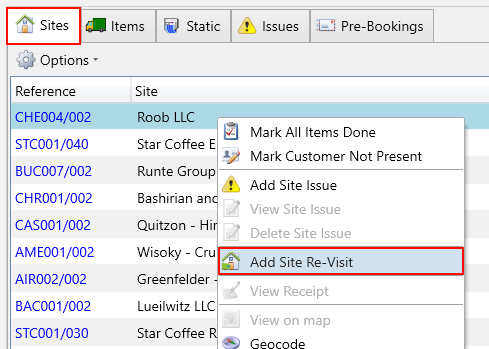
You will then be shown the Site Re-visit popup with the address and items for the job you selected displayed.
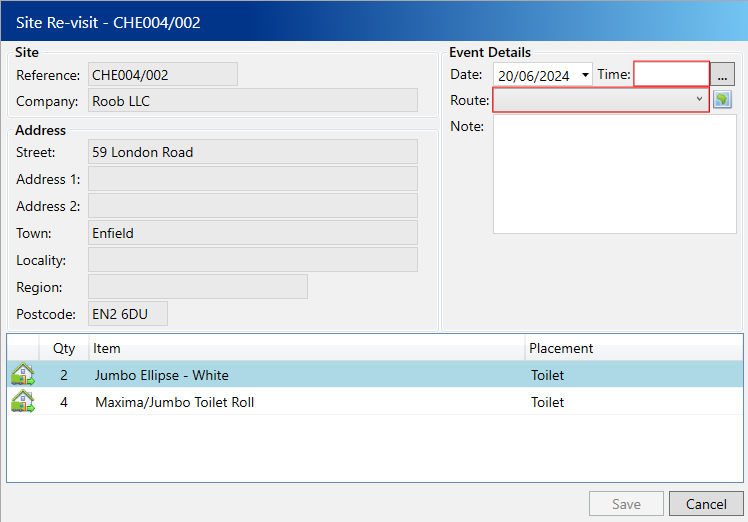
Enter the following compulsory fields:
- Date – The date you intend for the re-visit to be performed, which defaults to today.
- Time – The specific sequence on the selected date/route for delivering this item.
- Route– The designated route for delivering the item on the specified date.
Click the Save button