
There will be instances when you need to merge one or more agreements into a new agreement. This might be necessary if a site had an additional agreement added before renewal or if you are combining multiple sites and want to consolidate their agreements into one.
Creating a brand new agreement for the others to be merged into
Navigate to the New Agreements tab under the Customers section.

Next, click the New button. In the popup, go through the following pages to create your new agreement:
- Contractor – Select or create the contractor for the agreement. If the agreement is for a direct customer, you can skip this page by clicking Next.
- Customer – Select or create the customer for the agreement.
- Site – Select or create the site for the agreement.
- Agreement – Enter specific details for the agreement, such as the invoice period and start date.
After completing the Agreement page, click the Finish button to create your new agreement. The popup will close, and your new agreement will be displayed, ready for you to merge the other agreements.
Merging a live agreement into new agreement
Use the filters on the left to search for the new agreement into which you want to merge the other agreements. If you have just created a new agreement as described above, it will already be selected.
Click the Options menu, then select Import Agreement.
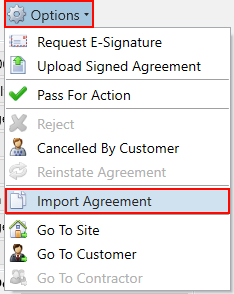
A popup will appear for you to select the active agreement that you want to merge into the New Agreement. Choose one from the grid, then click the OK button. Afterward, the items and associated placement information from the merged agreement will be copied into the New Agreement.
You can add more placements or items to the agreement as usual. Once done, you can move it to the Pending Agreements area and then to Live Agreements as needed.
Cancelling the live agreement now that it has been merged
Once you have merged your agreement into the NewAgreement, you may want to cancel the existing Live agreement because it has been superseded by the newly merged agreement. You can opt to cancel it immediately or wait until the new agreement goes live.
To cancel the agreement, navigate to the Agreements tab in the Customer section.
Click the Options menu, then choose Terminate Contract.
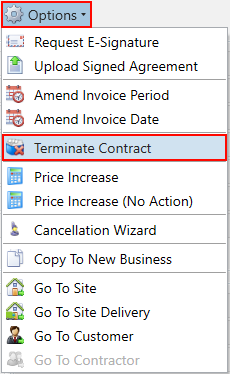
Proceed through the prompts to confirm the cancellation and move the agreement into Old Agreements.