
Once a lead is ready to become a customer, you can convert it into an agreement in Service Manager. This process allows you to carry over the details you’ve already captured for the lead and create a new agreement quickly.
Convert a Lead
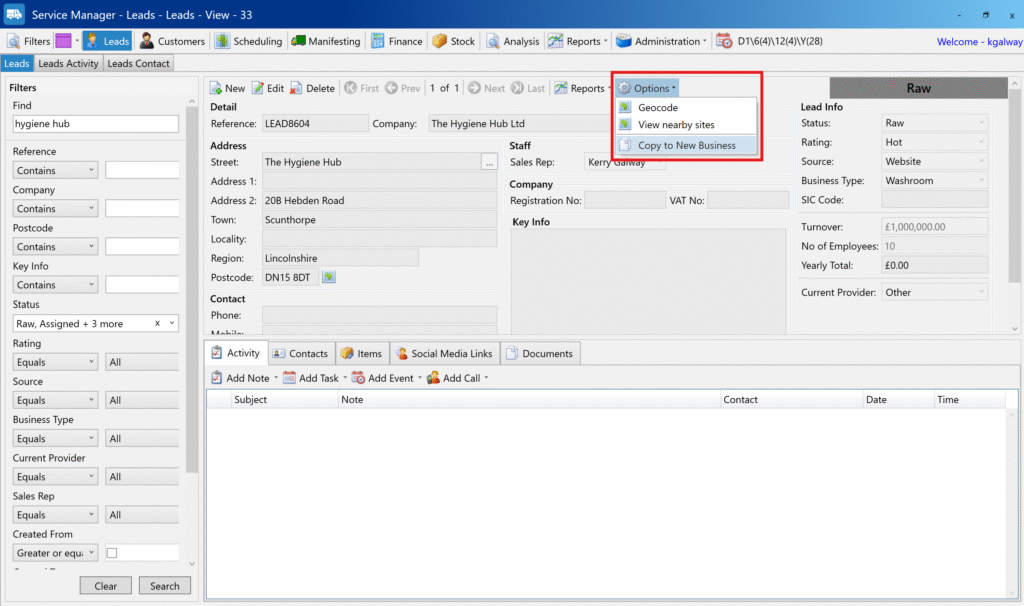
1. Find the Lead
- From the Home page, go to the Leads area.
- If needed, click the Search button to display your list of leads.
- Locate the lead you want to convert.
2. Copy to New Business
- Next to the lead, click the Options menu.
- Select Copy to New Business.
3. Choose Agreement Type
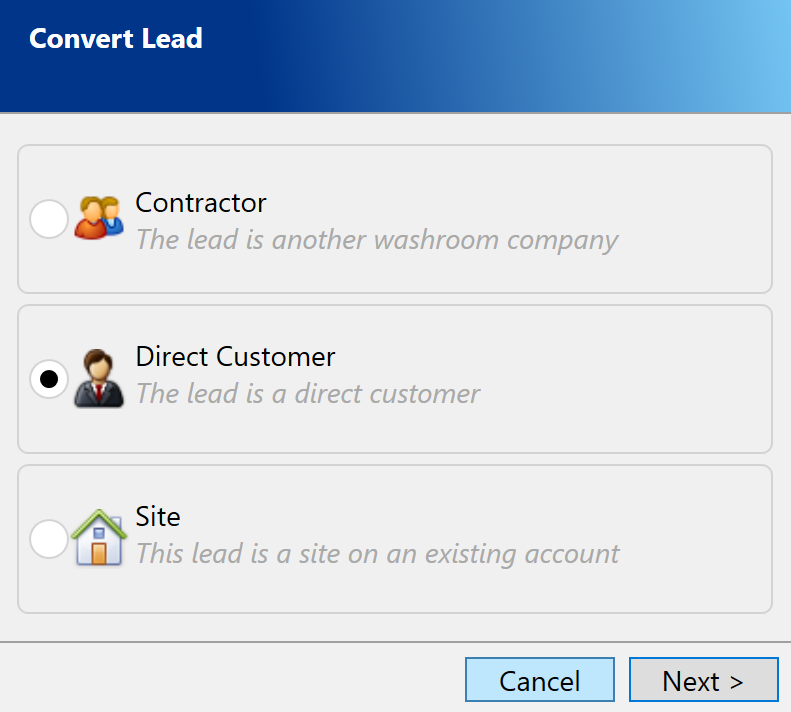
A Convert Lead popup will appear.
Here, you’ll choose one of three options:
- Contractor
- Direct Customer
- Site
Select the appropriate type based on the customer relationship.
4. Complete the Agreement
- After choosing the type, the system will guide you through the agreement creation process.
- This follows the same steps as creating a new agreement from scratch.
For full details on completing the agreement, see: How to Create a New Agreement
Notes & Tips
- Converting a lead saves time by reusing the information you’ve already entered.
- Make sure to check and update all fields during the agreement process to ensure accuracy.