
When an invoice is generated, it will be marked as direct debit if the associated account code is set to direct debit. You can still amend the direct debit status of invoices after they are created.
Amending the direct debit status of the account code
Navigate to the Accounts tab under the Finance section.

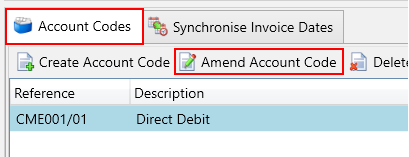
Next, use the filters on the left to find the account for which you want to update the account code. Then, click on the Account Codes tab. In the grid, select the account code you wish to update and press the Amend Account Code button.
Use the direct debit checkbox to change the direct debit status.
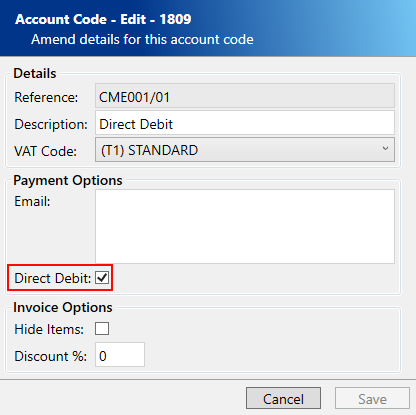
Click the Save button.
From now on, when you create an invoice for this account code it will be marked as direct debit.
Amending the direct debit status of an existing invoice
Navigate to the Invoices screen under the Finance section.

Next, use the filters on the left to find the invoice for which you want to update the direct debit status. Then, click on the Edit button.
Use the Invoice paid by Direct Debit checkbox to change the direct debit status.
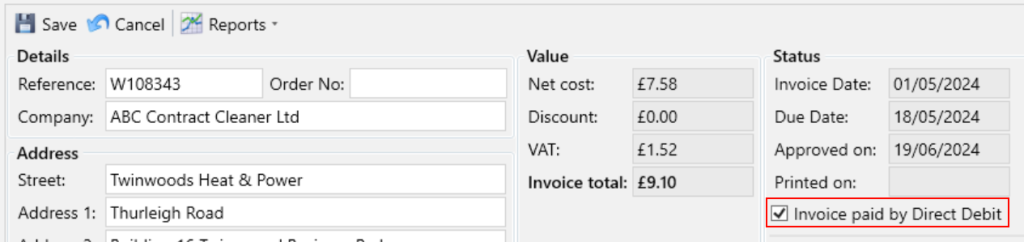
Click the Save button.
For this specific invoice, you have selected it to be paid by direct debit. This choice will not impact future invoices associated with this account code.