Even if you have allocated your items to a site schedule, there are certain scenarios that can cause items to be omitted from being manifested. These scenarios are detailed below.
Item is on hold
When an item is on hold, it will not be manifested between the On Hold dates. If an item is on hold indefinitely, it will not be manifested after the “On Hold From” date.
To view items on hold for a site, navigate to the Site Delivery tab in the Customers section.

Use the filters on the left to search for the site that you want to view the held items for. Then, click the Held Items tab.

In the example above, both items have been placed on hold since May 12th. One of the items is on hold until June 19th, while the other is on hold indefinitely since it does not have an On Hold To date specified.
Item not installed yet
If an item is scheduled to be installed but the manifest date is before the installation date, it will not be manifested. For example, if you are scheduled to service the site on 31st May but the item isn’t set to be installed until the 5th June, it cannot be serviced as it has not been installed yet.
Item has been collected
If an item is scheduled to be collected and the manifest date is after the collection date, it will not be manifested. For example, if you are scheduled to service the site on 31st May but the item was collected on 25th May, it cannot be serviced as it has already been collected.
Agreement not started yet
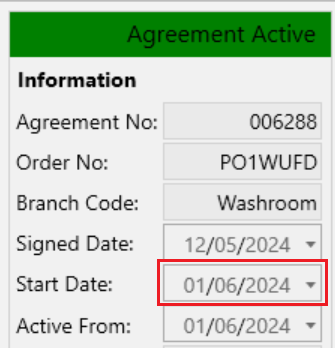
Every agreement has a “Start Date”, items on an agreement will not be manifested before this start date.