
Appearance
Understanding Delivery Periods
In order to accommodate your customers many different delivery requirements, Service Manager creates a calendar and assigns the different delivery periods to each day.
The standard delivery periods are:
- Weekly
- Fortnightly
- Monthly
- 5 Weekly
- 6 Weekly
- 8 Weekly
- 12 Weekly
- Yearly
Within Service Manager each of these delivery frequencies uses a different code. As shown in the below table.
| Frequency | Codes | Description |
|---|---|---|
| Weekly | ABCD | Deliver every week |
| Fortnightly | AC, BD | Every 2 weeks (2 alternating sets) |
| Monthly | A, B, C, D | One delivery every four weeks (13 a year). Each letter is one week of the four-week cycle. |
| 5 Weekly | 5(1) – 5(5) | Every 5 weeks, 5 unique cycles |
| 6 Weekly | 6(1) – 6(6) | Every 6 weeks, 6 unique cycles |
| 8 Weekly | A1, B1, C1, D1, A2, B2, C2, D2 | Every 8 weeks, 8 groups over 2 full cycles |
| 12 Weekly | 12(1) – 12(12) | Every 12 weeks, 12 distinct groups (1 per week in 12-week span) |
| Yearly | Y(1) – Y(52) | Once per year, specific to one week (e.g. Week 1 to Week 52) |
For a detailed explainer on the different delivery periods, see the sections below.
Weekly, Fortnightly and Monthly
By using the code method you only need to allocate each site to a delivery period once. As you can see on the calendar below, the codes repeat every four weeks, and carry on across the end of the month.
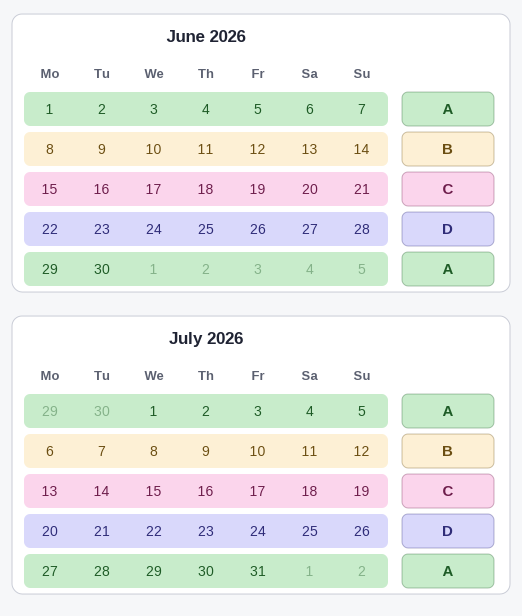
Your own A, B, C and D weeks are set by your service dates, so they may fall on different weeks from this example. See How do I create service dates for the year?
- If you wanted weekly services you would just pick A+B+C+D (ABCD)
- If you wanted fortnightly services you could put them onto the A+C Weeks (AC) or the B+D Weeks (BD)
- If you wanted monthly you would pick just one of A,B,C or D
You can mix and match frequencies for a single site by adding multiple delivery routes for the site. For example a site may want some items serviced weekly but others monthly on the second week of the cycle, so you would add an ABCD delivery and a B week delivery for that site.
8 Weekly
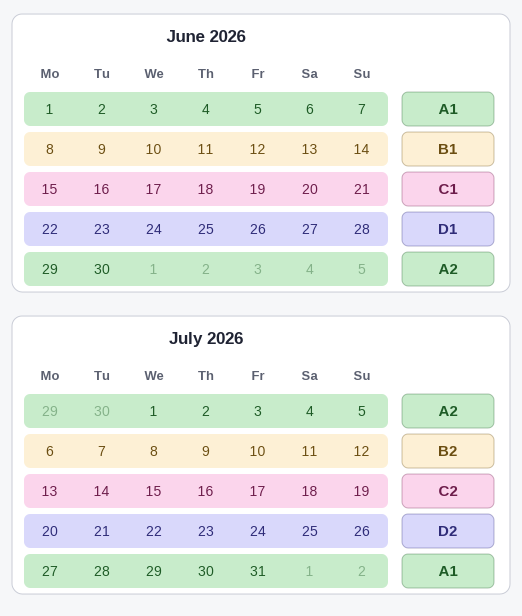
The calendar below shows how the 8 weekly delivery codes fit into a typical two month period.
You will notice that this follows the same pattern as the Weekly, Fortnightly and Monthly schedule, every time a new A week starts it goes from A1 to A2 then back to A1 again.
5 Weekly, 6 Weekly and 12 Weekly
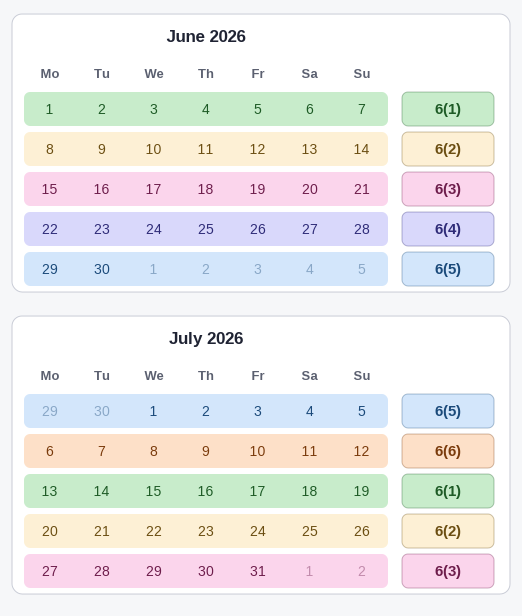
The calendar below shows how the 6 weekly delivery codes fit into a typical two month period.
TIP
The 5 and 12 weekly cycle follows the same pattern as the 6 weekly, but with 5 and 12 weeks instead of 6!
Yearly and Six Monthly
The yearly deliveries are self explanatory in that you just pick which week of the year you would like the service to be completed on; for six monthly services, you simply add two yearly deliveries to a site!
To find the week of the year that you need, the Delivery Calendar is there to help you find delivery periods easily.
In the top right of the screen there is always a label showing the current week’s delivery period in full.
When you click this text the Delivery Calendar opens, showing the whole year. You can select any date on the calendar and it will show you the delivery periods due on that date in the Recurrence patterns list on the right.
TIP
You may wonder why we don’t show the Weekly, Fortnightly and Monthly letters in the Current Week. This would actually show as ABCD/AC/A/A2/6(3)/12(9)/Y(21) as you can see the ‘A’ just repeats. Visually therefore it’s easier and less confusing to keep the one A.