
Appearance
How to Create the Manifest
A manifest must be created before any work can be carried out.
The manifest is what makes jobs live and pushes them to the driver app for the selected day or week.
If a manifest does not exist, drivers will not see their work.
Key Information
- A manifest is required to make jobs live for drivers
- You can create a manifest for:
- A single day
- The rest of the week
- A single depot only
- Changes made to site deliveries or agreements will not update a manifest that has already been created
- If changes are made, the route must be rebuilt for those changes to appear
- Delivery events such as ad-hoc jobs or installs are not affected in the same way as standard site deliveries
Creating a Manifest
- Click Manifest, then the Manifest (Route) tab.
- Click Create Manifest.
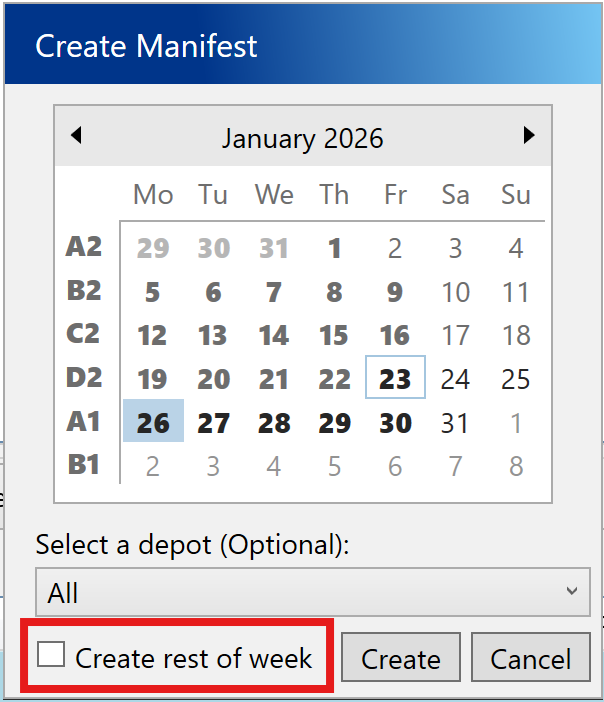
- The calendar will open.
- Select the date you want to create the manifest for.
- If you only want to create it for one depot, choose it from Select a depot (Optional).
- Click Create.

Creating multiple days
- Tick Create rest of week to create manifests up to Sunday
- A progress window will display while the manifests are being created
- Once complete, the newly created routes will be selected automatically
Recreating a Manifest
A route must be rebuilt if changes are made after the manifest has already been created, for example:
- Adding a new site
- Adding or updating an agreement
- Changing items assigned to a route
To rebuild a route
Select the route you’d like to rebuild, right-click it and select Rebuild Route. You can also use Options → Rebuild Route. You will be asked to confirm the route rebuild.
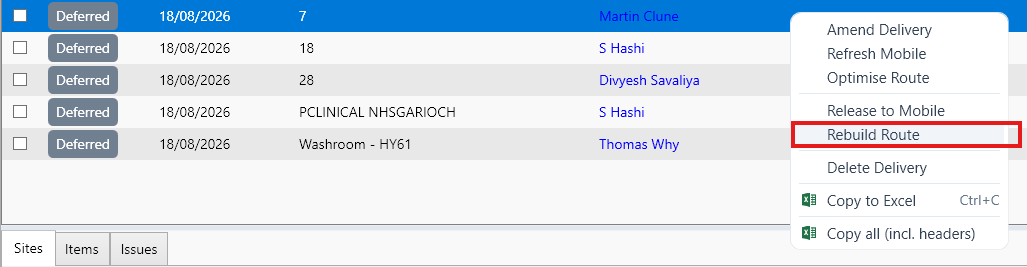
Jobs that are no longer due are taken off the route, and any new jobs are added.
When a route cannot be rebuilt
You can only rebuild a route while it is Deferred, that is, not yet released to the driver's phone. Once a route is Released, Rebuild Route is no longer shown.
To rebuild a released route, unrelease it first. You can't unrelease a route once something on it has been signed for on the mobile app. In this case, the existing route must be completed as it is.
See How To Send Manifest To Mobile for more on releasing and unreleasing routes.